
TopScan - Basic Operations
TopScan - Basic Operations
1. How to pair TopScan VCI with iPhones(ios)?
Please follow below steps:
a. Please make sure the VCI is powered on or connected to the car before pairing;
b. Turn on Bluetooth on your phone, search for the device SN, and then click the SN to pair;
c. Enter the TopScan app, click Diagnostics to check whether the VCI is connected successfully;
d. After the connection is successful, the diagnostic function can be performed.
Video reference:
2. How to pair TopScan VCI with android phones?
Please follow below steps:
a. Please make sure the VCI is powered on or connected to the car before pairing;
b. After turning on the Bluetooth of your phone, enter the TopScan app;
c. Click the diagnostic menu to enter, and click the VCI icon in the upper right corner of the screen to enter;
d. Click the Refresh button to search for the device SN, then click Connect to pair the VCI.
Video reference:
3. How to upload the diagnostic log?
This operation is recommended when an error message pops up when diagnosing.
Method 1: click the feedback icon to submit the log when there are any errors
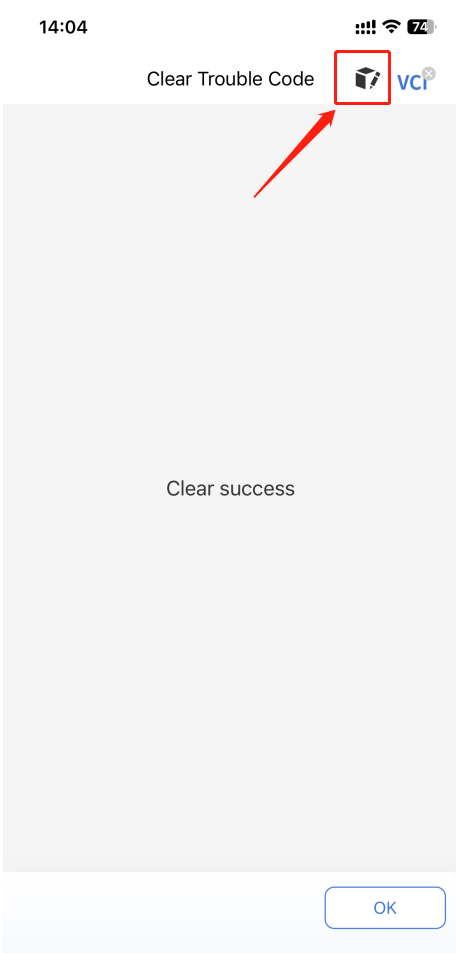
Method 1: click the feedback icon to submit the log when there are any errors
Method 2: enter the APP >Me >Help and Feedback to fill the the relevant info and submit
4. How to upgrade the TopScan/TopGuru app version?
IOS: please enter the APP Store to check for updates;
Android: enter the TopScan app > Settings > About.
5. How to delete/remove vehicle diagnostic software?
Please follow thia path: enter the app > Me > Uninstall Software, select the car model and click Delete.


